
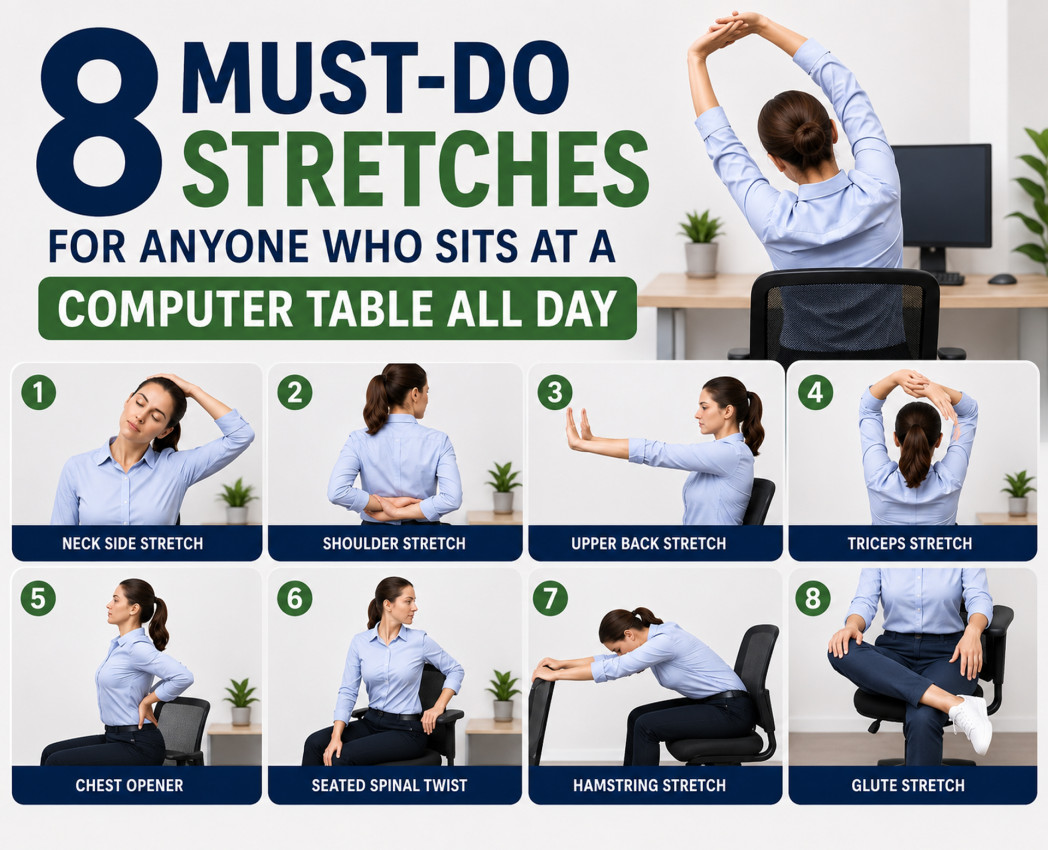
8 Must-Do Stretches for Anyone Who Sits at a Computer Table All Day
Introduction
Raise your hand if this sounds familiar. You sit down at your workstation table at 9 AM, dive into back-to-back calls and deadlines, and by lunchtime your neck feels like it has turned into cement. By evening, your lower back is quietly filing a resignation letter.
You are not alone. With remote and hybrid work now a permanent fixture across Indian cities, millions of professionals are spending 8 to 12 hours a day glued to their screens. The result is a quiet epidemic of desk-related stiffness, chronic neck tension, and lower back pain that no amount of weekend rest fully fixes.
The good news? You do not need a gym membership or a yoga mat. A handful of targeted desk stretching exercises done right at your computer table can make a real difference. These are practical, low-effort exercises you can do while sitting at your desk, no floor space, no equipment, no excuses.
Why Desk Exercises Are Non-Negotiable for WFH Professionals
Prolonged sitting tightens the hip flexors, compresses the lumbar spine, rounds the shoulders forward, and locks the neck into a forward-head posture. Over weeks and months, this becomes chronic pain, the kind that builds slowly until it is impossible to ignore.
Desk exercises, especially stretching exercises at the computer table done at regular intervals, counteract these effects in real time. They restore blood flow to fatigued muscles, reset your posture, reduce stress hormones, and help you avoid the dreaded 3 PM energy crash. For WFH professionals in India who are often working from dining chairs or home setups without proper ergonomic support, these stretches are not optional. They are essential.
The 8 Best Desk Stretches for WFH Professionals
1. Chin Tuck, The Neck Reset Your Posture Needs
This is the single most important stretch for screen workers. Forward-head posture, where your neck juts ahead of your shoulders, is the leading cause of neck and back pain for WFH professionals. The chin tuck directly corrects it.
How to do it: Sit tall with your back against the chair. Without tilting your head up or down, gently pull your chin straight back as if you are making a double chin. Hold for 5 seconds, release, and repeat 10 times. Aim to do this 3 to 4 times throughout your workday.
This one stretch, done consistently, can reverse months of screen-induced neck stiffness.
2. Seated Neck Side Stretch, Release the Shoulder-to-Ear Tension
If you have ever caught yourself scrunching your shoulders up near your ears during a stressful video call, this is your go-to fix. It targets the upper trapezius muscle, which carries the bulk of desk-related tension in most people.
How to do it: Sit upright and drop your right ear toward your right shoulder. Optionally, place your right hand gently on top of your head for a slightly deeper stretch. Hold for 20 to 30 seconds, then switch sides. Two sets per side, done mid-morning and mid-afternoon, works well for most people.
3. Thoracic Extension Over Chair, Undo the Desk Hunch
After hours of leaning forward over a keyboard, extending your upper back over the chair backrest feels like pressing a reset button on your spine. This is one of the most satisfying office chair stretches at home and delivers immediate relief for mid-back stiffness.
How to do it: Sit near the front edge of your chair and interlace your fingers behind your head. Gently lean back over the top edge of your chair back, arching your upper spine. Look up slightly and hold for 10 to 15 seconds. Come back up slowly and repeat 3 to 5 times.
If your chair back is low, a rolled-up towel placed at mid-back height works just as well.
4. Seated Cat-Cow, Spinal Mobility in Two Minutes
Borrowed from yoga, the seated cat-cow is one of the best stretching exercises at the computer table for waking up a stiff lumbar spine. It mobilises each vertebra in sequence and is gentle enough to do even when your back feels particularly tight.
How to do it: Sit with both feet flat on the floor and hands resting on your knees. Inhale and arch your lower back, lift your chest, and look up slightly. Exhale and round your lower back, tuck your chin, and curl inward. Flow between both positions for 8 to 10 slow, controlled repetitions. Focus on breathing deliberately throughout.
5. Seated Figure-Four Hip Stretch, For Marathon Sitting Sessions
Tight hips are one of the most underestimated side effects of prolonged sitting. The hip flexors shorten over time and pull the pelvis into an anterior tilt, which is actually one of the main drivers of lower back pain at the desk. This is a simple desk exercise for remote workers that addresses that root cause directly.
How to do it: Sit near the edge of your chair with your back straight. Cross your right ankle over your left knee, forming a figure-four shape. Gently press down on your right knee and lean forward slightly from the hips until you feel a stretch in the outer hip. Hold for 30 to 45 seconds and switch sides. Do two rounds per side.
6. Chest Opener With Arm Clasp, Fix Rounded Shoulders
Typing and using a mouse keeps your arms in front of your body for most of the workday. Over time, the chest muscles shorten and pull the shoulders forward into that rounded, closed-off posture that looks and feels terrible. This desk stretch for WFH professionals reverses that pattern in under a minute.
How to do it: Sit or stand behind your chair. Clasp your hands together behind your back, straighten your arms, and squeeze your shoulder blades together. Lift your hands slightly and open your chest. Look slightly upward. Hold for 20 to 30 seconds, release, and repeat twice.
This stretch pairs well with the thoracic extension above for a complete upper body reset.
7. Wrist and Forearm Stretch, The Coder and Writer's Best Friend
If your work involves heavy typing, whether it is writing, coding, or managing spreadsheets, your forearms take a quiet but relentless beating. Carpal tunnel syndrome and repetitive strain injuries almost always begin with wrist stiffness that gets ignored. These computer table exercises take barely a minute and can prevent serious long-term damage.
How to do it: Extend one arm in front of you with your palm facing down. Use your other hand to gently pull the fingers back toward you. Hold for 20 seconds. Flip the palm up and pull the fingers downward. Hold for another 20 seconds. Switch hands and repeat. Do this two to three times a day, especially after long writing or coding sessions.
8. Seated Spinal Twist, The End-of-Day Full Body Unwind
Save this one for after lunch or just before your last work session of the day. The seated spinal twist addresses the rotational stiffness that builds from sitting in a static, forward-facing position for hours. It is also one of the few computer table exercises India's traditional wellness practices and modern physiotherapy both agree on, gentle spinal rotation supports both back health and digestion.
How to do it: Sit sideways on your chair with your spine tall and feet flat on the floor. Hold the chair back with both hands and gently rotate your torso toward the back of the chair. Hold for 20 to 30 seconds while breathing deeply. Spin the chair around and repeat on the other side. Two to three repetitions per side is enough.
A Simple Daily Stretch Schedule That Actually Works
The real challenge is not learning the stretches. It is remembering to do them when you are deep in work mode. Here is a simple daily structure that fits into a typical Indian WFH schedule:
- 9:00 AM, Morning warm-up: Chin tuck and seated cat-cow
- 11:00 AM, Mid-morning reset: Neck side stretch and wrist stretch
- 1:30 PM, Post-lunch reboot: Thoracic extension and hip figure-four
- 4:00 PM, Afternoon slump fix: Chest opener and spinal twist
Each session takes 4 to 6 minutes. Total daily investment is under 20 minutes. Set phone alarms or calendar reminders, the biggest reason people skip stretches is not laziness, it is simply forgetting.
Your Workstation Setup Matters Too
No amount of desk stretching exercises fully compensates for a genuinely poor workstation setup. The right foundation makes every stretch more effective and prevents pain from returning as quickly.
Monitor height is the most overlooked factor. The top of your screen should sit at or just below eye level. If you are working on a laptop placed flat on your metal wood computer table, prop it up on books or a stand. Your neck will notice the difference within days.
Your chair and desk pairing matters as well. Forearms should rest parallel to the floor when typing. If your workstation table is too high or too low relative to your chair, the ergonomics break down regardless of how often you stretch. A rolled dupatta or small cushion behind the lower back can simulate lumbar support if your chair lacks it.
Keep your keyboard and mouse close to your body so your shoulders are not constantly reaching forward. It sounds minor but prevents significant shoulder and wrist fatigue over a long workday.
Final Thoughts
The most productive professionals are not the ones who grind without stopping. Regular movement breaks improve cognitive function, creative thinking, and sustained attention. Stretching is not a distraction from work, it is what makes high-quality, sustained work possible.
Think of these desk exercises the same way you think of charging your phone. Non-negotiable maintenance that keeps the whole system running. Your body is the hardware everything else runs on. It deserves a few minutes of care during the workday, not just after hours.
Start with two or three stretches from this list today. Build the habit gradually. Within a couple of weeks, the difference in how you feel at 6 PM will be reason enough to keep going.
-
 August 24th, 2026
 -
 August 10th, 2026
 -
 June 24th, 2026
 -
 May 20th, 2026
 -
15 Creative PG Room Decor Ideas to Make Your Space Feel Like Home
April 16th, 2026