

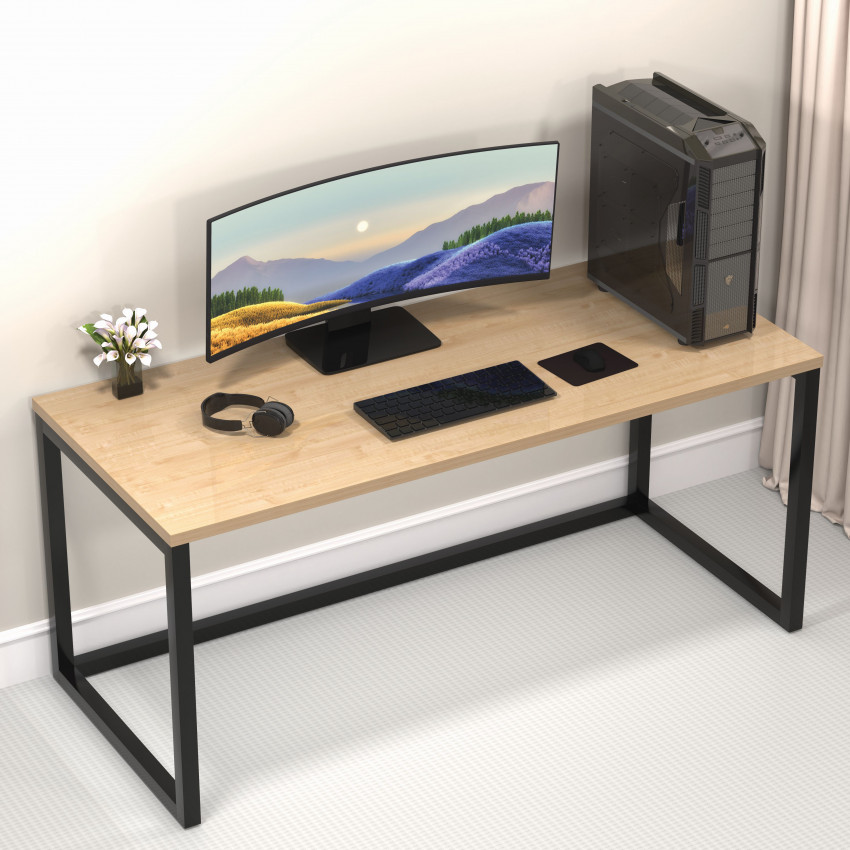
Computer Table Size Guide: Standard Dimensions, Height & Setup Measurements
Choosing the right computer table is more than just finding a design that looks good. The size, height, depth, and available workspace can directly affect your comfort, posture, productivity, and overall room layout. Whether you are setting up a home office, study corner, gaming area, or work-from-home space, selecting the right computer table dimensions is essential.
At HoneyTouch, we understand that every home has different space requirements. That is why it is important to understand standard computer table measurements before making a purchase.
What Is the Standard Size of a Computer Table?
A standard computer table generally has:
- Height: 28–30 inches
- Width: 36–48 inches
- Depth: 20–30 inches
These dimensions provide enough space for a monitor or laptop, keyboard, mouse, and essential accessories while maintaining a comfortable working position.
However, the ideal size depends on how you plan to use the table and how much space is available in your room.
Standard Computer Table Height
The height of a computer table plays an important role in maintaining a comfortable sitting position. For most adults, a table height of around 28 to 30 inches works well with a standard chair.
Ideally:
- Your elbows should remain close to your body.
- Your forearms should rest comfortably on the table.
- Your shoulders should stay relaxed.
- Your feet should rest flat on the floor.
The monitor should be positioned at a comfortable viewing level.
If the table is too high, you may need to raise your shoulders while typing. If it is too low, you may have to bend forward, which can make long working sessions uncomfortable.
Standard Computer Table Width
The required width depends on the equipment you want to place on the table.
36–40 Inches
A compact computer table in this range is suitable for:
- Laptops
- Small monitors
- Study work
- Small bedrooms
- Compact home offices
It is a practical choice when floor space is limited.
42–48 Inches
A wider table provides more workspace for:
- Desktop computers
- Large monitors
- Keyboard and mouse
- Speakers
- Notebooks and documents
- Office accessories
If you work from home regularly, a wider table can provide greater flexibility.
48 Inches or More
Larger tables are useful for users who need multiple monitors, additional equipment, or a dedicated workstation. However, they require more floor space and should be selected according to your room dimensions.
Ideal Computer Table Depth
Computer table depth is often overlooked, but it is just as important as width.
A depth of approximately 20–30 inches is commonly suitable for most computer setups.
A depth of around 20–24 inches can work well for a laptop or compact monitor setup. If you use a larger monitor, desktop accessories, documents, or multiple screens, a deeper table can provide additional working space.
The table should allow enough distance between your eyes and the monitor while leaving sufficient room for your keyboard and mouse.
How to Choose the Right Computer Table Size for Your Room
Before purchasing a computer table, measure the available area where you plan to place it.
Consider these factors:
1. Measure the Available Wall or Floor Space
Measure the width and depth of the area where you want to place the table. Leave some space around the table so that you can comfortably sit down and move the chair.
2. Consider Your Equipment
Think about what you will keep on the table. A laptop requires less space than a desktop computer with a large monitor.
If you use two monitors, speakers, a printer, or other accessories, choose a wider and deeper table.
3. Check Chair Compatibility
The table and chair should work together. A standard-height table should have enough legroom underneath and allow you to sit comfortably without your knees hitting the underside.
4. Consider Storage Requirements
If you need drawers, shelves, or compartments for documents and accessories, account for the additional space they may occupy.
A minimalist table may be better for a small room, while a larger workstation can be useful for a dedicated home office.
Computer Table Measurements for Different Uses
Use | Recommended Width | Recommended Depth | Approx. Height |
Laptop Work | 36–40 inches | 20–24 inches | 28–30 inches |
Study Table | 36–42 inches | 20–24 inches | 28–30 inches |
Home Office | 42–48 inche | 24–30 inches | 28–30 inches |
Desktop Setup | 42–48 inche | 24–30 inches | 28–30 inches |
Dual Monitor Setup | 48–60+ inches | 24–30 inches | 28–30 inches |
These are general guidelines. Your ideal dimensions may vary depending on your height, chair, equipment, and room layout.
How Much Space Do You Need for a Computer Table Setup?
The table itself is only part of the setup. You also need sufficient space for your chair and movement.
When planning your workstation, consider:
Table + Chair + Legroom + Movement Space
Avoid placing the table in a location where the chair blocks a doorway, cupboard, or walking path.
For smaller rooms, a compact computer table can help maximize available floor space without compromising your basic workspace.
Computer Table Setup for Work From Home
For a work-from-home setup, choose a table that provides enough space for your computer, keyboard, mouse, documents, and other daily essentials.
A 42–48-inch wide table with approximately 24–30 inches of depth can be a practical choice for many home-office setups.
If you use two monitors or additional equipment, consider a wider workstation.
Keep frequently used items within easy reach and avoid overcrowding the tabletop. A clean workspace can make your work area more comfortable and organized.
Computer Table for Small Rooms
If you live in a compact apartment, bedroom, or studio, choosing a smaller table can make a significant difference.
Look for:
- Compact dimensions
- Slim designs
- Adequate legroom
- Minimal storage requirements
- Strong and stable construction
- Easy-to-maintain surfaces
A metal computer table can be a practical option when you want a sturdy workstation without making the room feel too bulky.
Why Choose a Metal Computer Table?
A metal computer table can offer a combination of strength, durability, and practical design. Metal frames are particularly useful for everyday work and study environments because they can provide stable support for computers, monitors, and accessories.
For homes where furniture needs to withstand regular use, a well-built metal table can be a reliable long-term choice.
HoneyTouch focuses on practical furniture solutions designed for modern Indian homes, combining functionality with space-conscious designs.
Tips for Setting Up Your Computer Table Correctly
Once you have selected the right table size, your setup also matters.
Keep the Monitor at a Comfortable Height : Position your monitor so you can look at the screen without constantly bending your neck.
Maintain Enough Keyboard Space : Your keyboard and mouse should have sufficient space so you don’t have to work at the edge of the table.
Keep the Table Organized : Use cable management solutions and avoid placing unnecessary items on your work surface.
Leave Enough Legroom : Make sure drawers, shelves, or other components do not restrict your legs while sitting.
Match the Table With Your Chair : The chair height should allow you to sit comfortably while keeping your arms in a natural position when typing.
How to Measure a Computer Table Before Buying
Before purchasing, check these key measurements:
- Table Width: Measure from left to right.
- Table Depth: Measure from the front edge to the back edge.
- Table Height: Measure from the floor to the top surface.
- Under-Table Clearance: Check the available legroom beneath the tabletop.
- Available Room Space: Measure the location where the table will be installed.
Taking these measurements beforehand can help you avoid purchasing a table that is too large or too small for your space.
Final Thoughts
The right computer table size should provide a balance between comfort, workspace, equipment requirements, and available room space. For most users, a height of around 28–30 inches, a width of 36–48 inches, and a depth of 20–30 inches can provide a practical starting point.
However, the best dimensions ultimately depend on your individual needs. Before buying, measure your room, consider your computer setup, check your chair height, and make sure there is enough legroom.
Whether you need a compact study workstation or a spacious home-office setup, HoneyTouch computer tables are designed with everyday functionality and modern Indian homes in mind.
-

Bed Bugs vs Dust Mites on Your Mattress: How to Identify, Treat & Get Rid of Both
September 17th, 2026 -
 August 24th, 2026
 -
 August 10th, 2026
 -
 June 24th, 2026
